Data mapping records where personal data is stored, why the organization holds it, and where the data goes next. This guide explains the records that make up a data map, the ways to find the data, and the limits of each method.
Opsware designs and builds inventory, classification and reporting pipelines for data maps as part of our Data science services.
Four related pages each cover one narrower question:
- Record of processing activities (ROPA): fields and template lists the GDPR Article 30 fields and gives a template to copy.
- What a manual data inventory costs calculates the hours that a manual map takes.
- Data map cost estimate says what to send us for a quote.
- Data classification policy: levels, examples and a template sets sensitivity levels and handling rules for the data you find.
Three records that get called "the data map"
People use "data map" for three different records, and each has its own unit and answers its own questions.
| Record | One row per | Questions it answers | Usual owner |
|---|---|---|---|
| Data inventory (asset inventory) | System: a database, SaaS app, file share or warehouse table | Which personal data the system holds, who owns it, where it is hosted, how long it is kept | Security or IT, with input from privacy |
| Data flow map | Movement: system A sends a set of fields to system B | How data moves between systems, vendors and countries | Privacy and engineering together |
| Record of processing activities (ROPA) | Processing activity: "payroll", "newsletter marketing", "fraud screening" | Purpose, people and data categories, recipients, transfers, retention and security, as GDPR Article 30 lists them | Privacy team or the data protection officer (DPO) |
The inventory is organized by technology, and the ROPA is organized by purpose. One activity, such as recruiting, can use five systems, and one system, such as a CRM, can serve a dozen activities. A privacy program links the two records with IDs, so each ROPA entry lists its systems and each system lists its activities. The flow map shows the movements between systems, and transfers to other countries and disclosures to vendors are easiest to see on it.
Which laws ask for a data map
Only the EU and UK GDPR set out a record field by field. Other laws ask for an inventory in general terms, or ask for work that needs one.
| Source | What it asks for | Status in October 2026 |
|---|---|---|
| GDPR Article 30 | A written record of processing activities, with fixed fields for controllers and for processors, shown to the supervisory authority on request | In force. A proposal to widen the small-company exemption awaits a vote in the European Parliament. |
| UK GDPR Article 30 | The same record as the EU text. The ICO's documentation guidance recommends an information audit or data-mapping exercise to find the data. | In force. The ICO says the guidance is under review after the Data (Use and Access) Act 2025. |
| Minnesota, Minn. Stat. 325M.16 | Data security practices that include "the maintenance of an inventory of the data that must be managed" | In force |
| California CCPA regulations | Risk assessments for listed processing activities, with attestations and summaries due to the CPPA by April 1, 2028 (CPPA announcement) | In effect since January 1, 2026 |
| NIST Privacy Framework | An "Inventory and Mapping" category (ID.IM-P) in version 1.0, covering systems, owners, data subjects, data actions, purposes and processing environment | Voluntary |
Record of processing activities (ROPA): fields and template also covers the US state laws that require assessments.
What a system record should capture
A system record in the inventory needs the same core fields in any tool:
- System name and a stable ID. Names change ("the old Zendesk", "support tool"), but an ID such as SYS-031 stays the same.
- Business owner and technical owner. The business owner decides why the data is there, and the technical owner knows how to export or delete it.
- Data subjects. Customers, prospects, employees, contractors, children or patients.
- Data categories from a fixed list, with a flag for special categories such as health, biometric or precise location data.
- Hosting and access locations. The storage region, and the countries from which vendor support staff or sub-processors can reach the data.
- Vendor and contract. For SaaS, a link to the vendor's data processing agreement and sub-processor list.
- Retention rule, and whether the system enforces it or the rule is written down but not applied.
- Identifiers. Email, customer ID, device ID or hashed email. A request handler uses this field to find one person in the system.
- Request method. API, admin console export, ticket to the vendor, or a manual job for an engineer.
- Last review date and reviewer.
The identifier and request-method fields go beyond the legal minimum. With them, the inventory also tells a request handler how to find and handle one person's data in each system. DSAR automation: building the data subject request workflow describes the request workflow that uses those fields.
Discovery methods compared
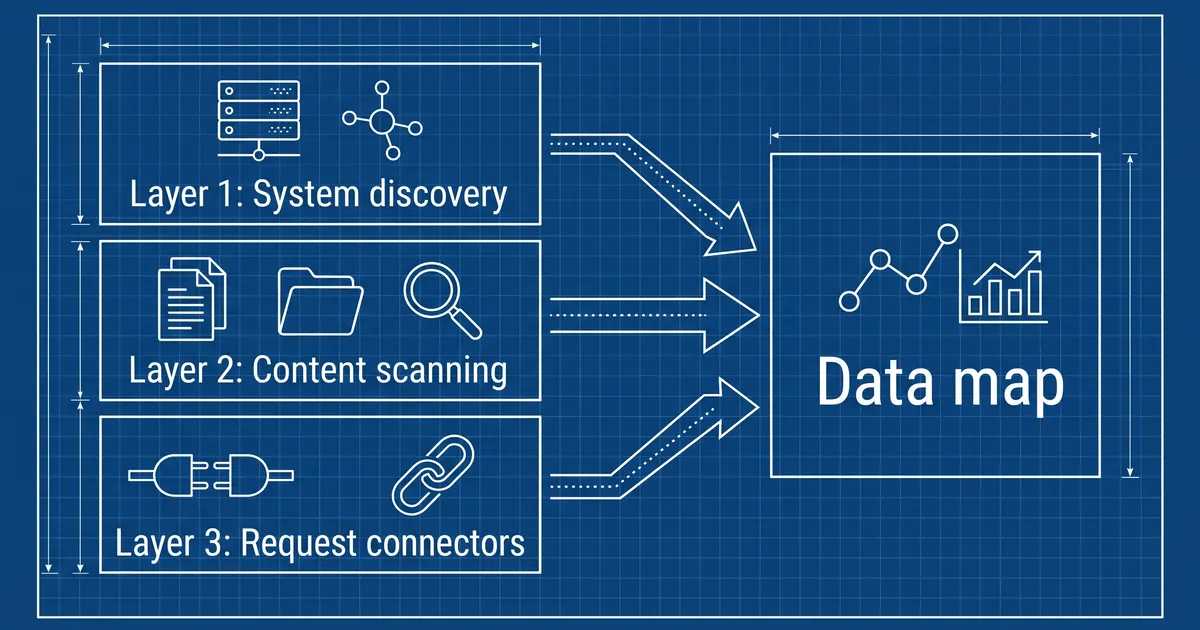
Data discovery is the step that finds the personal data, and teams either ask people or scan systems. Automated discovery has three layers, shown in the last three rows of the table below. Vendors combine the layers differently.
| Method | What it finds | What it misses | Main cost |
|---|---|---|---|
| Questionnaires and interviews | Purpose, legal basis, retention intent, informal processes | Tools that people forget, field-level detail | Staff time in interviews and follow-ups |
| System discovery (SSO, expenses, cloud accounts) | The list of systems, including tools bought outside IT | What each system holds, and why | Read access to admin consoles and billing data |
| Content scanning and classification | Which fields and files hold which data types | Purpose; data in formats the scanner cannot read | Connector setup, tuning, scanner access to production data |
| Request connectors | One person's records in a system, for export or deletion | Systems without a connector | Building and maintaining each connector |
Survey-based discovery
The traditional method is to ask: a privacy lead sends questionnaires to department heads, holds follow-up interviews, and assembles the answers into an inventory and a ROPA. Most first maps are built this way. Purpose, legal basis and retention intent are known to people, but database schemas do not record them. A scanner cannot say why marketing keeps a list of webinar attendees.
Survey-based maps have four common problems:
- People answer a different question from the one you asked. A support team that keeps free-text notes full of health details answers "no" to "Do you process sensitive data?" Questions about named fields and named tools get better answers.
- Informal systems are left out. People do not count a spreadsheet on a personal drive, a trial SaaS account paid by card, or a tracking script that an agency added to the website.
- The map is correct only on the day it is finished. Each new vendor, product feature and reorganization makes the map less accurate.
- The cost is spread across other teams. Most of the hours belong to the people being interviewed, so no single budget shows them. What a manual data inventory costs counts those hours.
Three changes make interviews faster and more accurate. Start each interview from a pre-filled system list, so people correct a draft instead of recalling from memory. Ask the owner to share their screen and open the tool. Cover one business process per session.
Automated discovery
Automated data mapping uses software for three jobs: listing the systems, classifying the data inside each system, and acting on requests.
Layer 1: system discovery
Classification needs a list of places to look. These sources produce that list, with the most reliable source first:
- SSO and identity provider app catalogs. Every app connected to single sign-on is a candidate system.
- Procurement and expense data. Recurring card charges from software vendors reveal tools that were never connected to SSO.
- Cloud provider inventories. Database instances, storage buckets and data warehouses in each cloud account.
- Website and app tag scans. Third-party scripts, SDKs and pixels that collect data from users directly.
- Browser extensions or network logs that record which SaaS domains employees visit. These tools monitor staff, so involve HR before you use them, and the works council if your company has one.
System discovery costs little. Use the list to pre-fill interviews, so that it includes tools that people forget to mention.
Layer 2: content scanning and classification
A scanner connects to each system and looks inside it. In databases and warehouses, it reads schemas and samples rows. In SaaS apps, it calls the vendor's API, and in file shares, object storage, ticket text and chat, it reads documents. Classifiers then tag fields or files as email addresses, phone numbers, national ID numbers, card numbers or health terms. They combine regular expressions, checksums for card and ID numbers, word lists, column-name rules and machine-learning models.
Cloud providers and open-source projects offer scanners that cover part of a company's systems:
| Tool | Scope | How it detects |
|---|---|---|
| Amazon Macie | Amazon S3 buckets only | Managed identifiers using machine learning and pattern matching, plus custom regular expressions. Macie's automated discovery samples objects from each bucket. |
| Google Cloud Sensitive Data Protection | BigQuery, Cloud SQL, Cloud Storage, Vertex AI training data, Amazon S3 and Azure Blob Storage | Inspects data with built-in and custom detectors, and reports the findings as data profiles at table, instance, bucket or container level |
| Microsoft Presidio (open source, MIT license) | Text, images and structured data that you pass to it | Named-entity recognition, regular expressions, checksums and surrounding context words |
Classification results need review before anyone relies on them:
- False positives are common. A nine-digit order number matches the pattern of a US Social Security number. A column named
nameholds product names, and test fixtures look like real customer data. Every scanner needs a tuning period and a way to mark a finding as "not personal data" so that it stays suppressed. - False negatives are harder to see. Scanners can miss personal data in free text, JSON blobs, base64-encoded payloads, image attachments, or languages the classifier was not trained on. The Presidio README states that "there is no guarantee that Presidio will find all sensitive information." A clean scan does not prove that a system holds no personal data.
- Sampling misses rare values. A scanner that samples 1,000 rows of a 50-million-row table can miss a field that is filled in for only a few users. Ask each vendor how sampling works, and whether you can run a full scan on a high-risk store.
- A classifier does not know the purpose. A scanner can report that a table holds email addresses, but it cannot say whether you may use those addresses for marketing.
- Scanner access is a security risk. A tool with read access to every production database is a target for attackers. Protect its credentials, network placement and stored samples like any other privileged system. GDPR Article 32 and security controls for personal data covers the basic controls.
Layer 3: connectors for requests
The third layer acts on data: a connector searches one system for a given identifier, then exports or deletes the matching records. This layer links discovery to the request workflow in DSAR automation: building the data subject request workflow. A tool that discovers 200 systems but has working request connectors for 15 of them leaves 185 systems for manual lookups. Ask each vendor for its connector list, and ask whether each connector supports search, export, deletion, or discovery only. Privacy software checklist for buyers has more questions to ask vendors.
A hybrid workflow
A workflow that combines the methods runs in this order:
- Build the system list automatically from SSO, procurement and cloud inventories.
- Sort systems by risk. Put systems with special-category data, large customer datasets, or data sent abroad at the top. Mark systems with no personal data, such as a status page tool, as out of scope and record the reason.
- Scan the systems that a scanner can reach, starting with production databases and the data warehouse. Review the findings with each technical owner.
- Interview owners about purpose, using the pre-filled list and the scan results. ROPA entries come from these interviews.
- Link activities to systems and record the flows between systems.
- Set triggers for updates, as described under "Keeping the map current" below.
Data mapping example: a customer support process
This example shows how one process becomes entries in all three records. The company and its systems are made up.
System discovery finds three tools from the SSO catalog and the expense report: a help desk (SYS-012), a live-chat widget (SYS-019) and a call recording service (SYS-027). A scan of the help desk export finds email addresses, phone numbers and order numbers in structured fields, and dates of birth and health terms in free-text ticket bodies.
The interview with the support lead adds the facts a scan cannot find. The team keeps tickets for three years to handle warranty claims, and agents paste order details from the online shop's database into tickets. The call recording vendor stores audio in the United States under standard contractual clauses. Nobody had asked customers to leave health details out of the chat form.
The work produces these records:
- Inventory: three system rows, each with an owner, hosting region, identifiers and request method. The help desk row gets a special-category flag because of the free-text findings.
- Flow map: chat widget to help desk; online shop database to help desk; call recordings from SYS-027 to the vendor's storage in the United States.
- ROPA: one activity, "customer support", that lists all three systems, the warranty purpose, the three-year retention rule and the US transfer under standard contractual clauses.
The example also produces follow-up work: a change to the chat form, a check of the call recording vendor's transfer terms, and a retention job for old tickets.
Keeping the map current
Updates to a data map cost least when they are attached to processes that already exist:
- Procurement intake. No vendor contract is signed until a short privacy questionnaire creates the inventory record. The same step starts the vendor review and the data processing agreement (DPA).
- Engineering design reviews. Engineers tag new tables or services that store personal data, for example with column comments or a data catalog entry, so the next scheduled scan includes them.
- Tool offboarding. When a vendor contract ends, the record is marked retired with a note on how the data was deleted or returned.
- Scheduled reviews. Owners confirm their records on a fixed cycle, commonly a quarterly review for high-risk systems and a yearly review for the rest. Track the last review date and follow up with owners who are late.
- Scanner alerts. If scans run on a schedule, raise an alert when a scan finds new personal data in a system previously marked clean.
What a manual data inventory costs estimates upkeep from the share of systems that change between reviews. In that page's worked example, upkeep makes up about 59% of the cost over three years.
Tasks that use a data map
A data map makes the following privacy tasks faster:
| Task | What the task needs from the map |
|---|---|
| Data subject requests (see Data subject access requests: how to respond, step by step) | Which systems to search for a person, by which identifier, and how to export or delete. The GDPR allows one month to respond, extendable by two further months (Article 12(3)). The CCPA allows 45 days, extendable once by 45 more (Cal. Civ. Code 1798.130). |
| Privacy notices | Accurate lists of data categories, purposes, recipients, retention periods and transfers |
| DPIAs and risk assessments | The systems, data categories and flows in a new project. GDPR Article 35 and the California risk-assessment rules both start with a description of the processing. |
| Vendor reviews | Which vendors receive which data, so that review effort goes first to vendors with sensitive data. The guides Subprocessor lists and change notices and Data processing agreement (DPA): what it must contain cover those vendor documents. |
| Breach response | For a compromised system, which people, data categories and jurisdictions are affected. Under GDPR Article 33, a controller must notify the supervisory authority within 72 hours of becoming aware of a breach. The duty does not apply when the breach is unlikely to result in a risk to people. |
| Retention and deletion | Where each data category is stored, so that retention rules can be enforced in each system |
Not legal advice. Whether a law requires a formal record, and in what form, depends on your organization and where it operates. Check the statute or regulator guidance for each jurisdiction.
Spreadsheet or dedicated tool
A spreadsheet or a small database works as a first data map for a company with a few dozen systems, one privacy person and few requests. Building privacy datasets that stay usable explains how to structure those tables, and Record of processing activities (ROPA): fields and template gives the columns for a ROPA.
Consider a dedicated tool under any of these conditions:
- The company has hundreds of systems, or many engineering teams that create new data stores.
- Request volume makes manual lookups a staffing problem.
- Large unstructured stores, such as file shares and ticket archives, hold personal data.
- Regulators or customers ask for evidence that the map is accurate, not only that it exists.
The privacy tech stack: privacy technology by layer shows how discovery tools relate to consent, request, vendor-risk and assessment tools. How to evaluate and choose privacy management software covers the buying process.
Common questions
What is data mapping?
The term covers the work of finding where an organization holds personal data, why it holds the data, and where the data moves. The results are a data inventory, a flow map and, under the GDPR, a ROPA.
Is a data inventory the same as a ROPA?
No. An inventory lists systems and the data in each system, while a ROPA lists processing activities with their purposes, recipients and safeguards. You can build a ROPA from an inventory plus interviews, but one record does not replace the other.
Does a small company need a data map?
GDPR Article 30(5) exempts organizations with fewer than 250 employees from the record-keeping duty. The duty still applies to three kinds of processing: regular processing, processing likely to result in a risk, and processing of special-category or criminal data. Payroll and customer billing are regular processing, so most small companies still need records for those activities. An EU proposal to raise the threshold awaits a Parliament vote. Record of processing activities (ROPA): fields and template tracks its status. A small company also needs a basic map to answer requests and write an accurate privacy notice.
How often should a data map be reviewed?
Attach updates to procurement and engineering changes first, then set a review cycle for owners. A quarterly review for high-risk systems and a yearly review for the rest is a common starting point, though no law sets that cycle.
Can automated discovery replace interviews?
No. Scanners find and classify data, but they cannot decide the purpose, the legal basis, or whether a retention period is justified. Scan results do make interviews shorter, because owners confirm findings instead of listing data from memory.
Where should a first data map start?
Start with the system list from SSO and expense data, then map the systems with the most sensitive data and the largest customer datasets. What a manual data inventory costs shows how to estimate the hours for a first pass.
Do data mapping tools need access to production data?
Content scanners need read access to the stores they scan, and many keep samples of the values they find. Ask each vendor where samples are stored and for how long, and give the scanner a dedicated account with read-only rights.
Need this built?
If you want this built for your systems, tell us about your project, and we will reply with questions or a rough plan.