A data classification policy sorts an organization's data into a few levels by the harm its exposure would cause, and sets handling rules for each level. This page gives a four-level scheme with examples, a policy template you can copy, and what GDPR, HIPAA and the US federal standards require.
Opsware builds classification, inventory and reporting pipelines for data maps as part of our Data science services.
Classification depends on knowing where the data is. The guide "Data mapping and discovery" covers how to find systems and scan them for personal data. This page covers the rules you apply once you have found it.
What a data classification policy contains
Most published policies, from university IT offices to state agencies, have the same parts:
- Purpose and scope: which data, systems, people and vendors the policy covers.
- Classification levels: usually three to five, each defined by the harm that exposure, loss or change would cause.
- Rules for assigning a level: who decides, what happens when a dataset mixes levels, and the default for unlabeled data.
- Handling rules: access, storage, encryption, sharing, labeling and disposal for each level.
- Roles: data owners, custodians and users, and their duties.
- Review, exceptions and enforcement: how often the policy and the classifications are reviewed, and who can approve an exception.
The policy sets levels and rules. A separate data inventory records which level each system or dataset has. The record of processing activities (ROPA) is a good place to keep that level, next to the categories of data each activity uses.
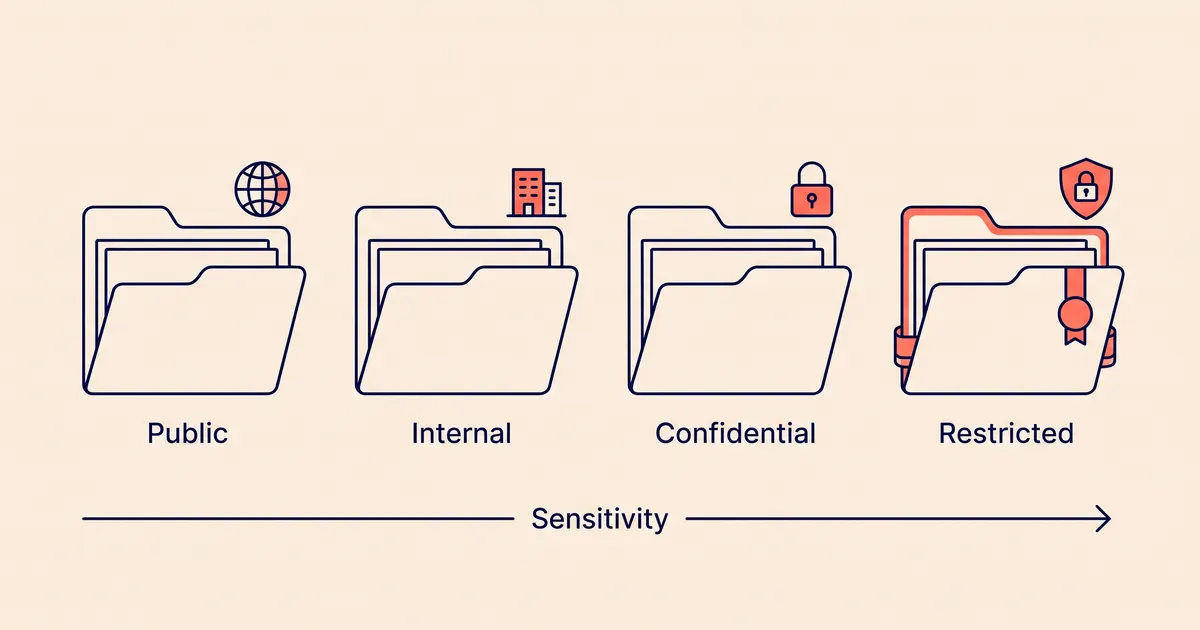
Data classification levels
Four levels is a common choice. The definitions below follow the harm-based approach of FIPS 199, which is covered later on this page.
| Level | Definition | Examples |
|---|---|---|
| Public | Approved for release to anyone. Exposure causes no harm. | Published website content, press releases, public price lists, job postings |
| Internal | For staff and approved contractors. Exposure would cause limited harm. | Internal procedures, org charts, most internal email, project plans |
| Confidential | For people with a business need. Exposure would cause serious harm to the organization or to individuals. | Customer and employee personal data, contracts, unreleased financials, source code |
| Restricted | For named people or roles only. Exposure would cause severe harm, or breaks a legal or contractual duty with specific penalties. | Special category data under GDPR, protected health information, government ID numbers, payment card numbers, passwords and encryption keys |
Each extra level is one more decision for every person who creates a file. A company with no regulated data can work with three levels by merging Confidential and Restricted.
Published schemes compared
Real policies use different names for similar levels. The University of Florida uses three levels, while the University of Kansas and Northwestern use four. Microsoft Purview's default labels show the scheme a Microsoft 365 tenant starts with.
| Source | Levels, least to most sensitive | How the top level is defined |
|---|---|---|
| University of Florida, policy 12-011 | Open, Sensitive, Restricted | Data protected by federal or state law, regulation or contract, such as medical records and Social Security numbers |
| University of Kansas | Public, Sensitive, Confidential, Restricted | Data whose disclosure could cause "exceptionally grave damage", such as PHI, cardholder data and controlled unclassified information |
| Northwestern University | Level 1 to Level 4 | Level 4 is government classified data, which the policy does not permit at the university. Level 3 differs from Level 2 by the risk of civil or criminal penalties. |
| Microsoft Purview default labels | Personal, Public, General, Confidential, Highly Confidential | Business data that would cause damage if shared with unauthorized people, such as employee and customer information, passwords and source code |
| FIPS 199 (US federal) | Low, Moderate, High impact | A severe or catastrophic adverse effect on operations, assets or individuals |
Personal data does not sit at one fixed level across these schemes. Microsoft's defaults put customer and employee information at the top level. Kansas puts names and contact details at Confidential and keeps Restricted for PHI and similar regulated data. Your policy needs to say where personal data goes, and the table under "Sensitive data classification examples" below gives one answer.
How to assign a level
Write these rules into the policy, so that two people classifying the same dataset reach the same answer.
- The most sensitive element sets the level. A spreadsheet of 500 customer emails with one column of card numbers is Restricted. FIPS 199 applies the same rule to federal systems and calls it the "high water mark": a system takes the highest impact value of any type of information stored on it.
- Combined data can rank higher than its parts. A list of names is Confidential, and a list of diagnosis codes with no identifiers may be Internal. Put the two together and you hold health data about identified people, which is Restricted.
- Volume can raise the level. One employee's phone number is Confidential. An export of every customer record may need Restricted handling, because a leak would affect everyone at once.
- Unlabeled data gets a default. Treat anything without a label as Internal at least. Microsoft's default label policy takes the same approach: it gives unlabeled documents, email and meetings the General label, using its sublabel "All Employees (unrestricted)".
- The data owner decides. The person who creates or collects data can propose a level, and the data owner confirms it. The University of Kansas policy assigns "data creators" a preliminary classification for this reason.
- Levels change over time. Quarterly results are Confidential until they are published and Public afterwards. Set a review date for anything classified because of timing.
Sensitive data classification examples
The table maps common data types to the four levels. The level in each row is a default, not a legal requirement. Adjust it to your contracts and the laws that apply to you.
| Data type | Level | Why |
|---|---|---|
| Marketing pages, published docs, public API reference | Public | Already released |
| Staff directory with names and work emails | Internal | Personal data, but known to every employee and low risk |
| Customer names, emails, addresses, order history | Confidential | Personal data under GDPR and US state privacy laws |
| Employee HR files, salaries, performance reviews | Confidential | Personal data with a high impact on the employee if disclosed |
| Contracts, pricing models, unreleased product plans | Confidential | Business harm if a competitor saw them |
| Source code | Confidential | Business harm, and it may hold secrets by mistake |
| Health, biometric or genetic data; religion, ethnicity, sexual orientation, union membership, political opinions | Restricted | Special category data under GDPR Article 9 |
| Medical records and claims held by a HIPAA covered entity or business associate | Restricted | Protected health information under HIPAA |
| Social Security, passport and driver's license numbers | Restricted | Can be used for identity theft |
| Payment card numbers | Restricted | PCI DSS sets protection rules for cardholder data |
| Passwords, API keys, private keys, database credentials | Restricted | Exposure gives an attacker access to other Restricted data |
| Criminal convictions and offences | Restricted | GDPR Article 10 limits who may process it |
Handling rules by level
The policy should set a rule for each level and each activity. The rules below are a starting point.
| Activity | Public | Internal | Confidential | Restricted |
|---|---|---|---|---|
| Who can access | Anyone | All staff and approved contractors | Staff with a business need, by role | Named people or roles, approved by the data owner, reviewed every quarter |
| Storage | Any approved system | Company-managed systems | Approved systems listed in the inventory | Approved systems only, with access logging |
| Encryption | Not required | In transit | In transit and at rest | In transit and at rest, with managed keys |
| Sharing outside the company | Allowed | Under an NDA or contract | Under a contract, and a data processing agreement for personal data | Only with data owner approval and a contract that covers the data |
| Public or personal AI tools | Allowed | Company-approved tools only | Company-approved tools with a data processing agreement and no training on inputs | Not allowed unless the data owner approves a specific system |
| Test and development environments | Allowed | Allowed | Masked or synthetic data only | Masked or synthetic data only |
| Labeling | None | Optional | Label on documents and in the inventory | Label on documents, in the inventory and in file metadata |
| Disposal | Normal deletion | Normal deletion | Secure deletion at the end of the retention period | Secure deletion, recorded |
Staff paste text into chat assistants, and LLM applications log prompts and responses. The article "PII redaction for LLM prompts and traces" covers how to detect and remove personal data before it reaches a trace store. The guide "GDPR Article 32 and security controls for personal data" covers encryption, access control and logging in more detail.
Data classification and GDPR
The GDPR does not define sensitivity levels or require a classification policy. It does create categories of data with different rules, and a classification policy is a practical way to apply them.
- Personal data (Art. 4(1)) is any information about an identified or identifiable person. All of it falls under the regulation, whatever level your policy gives it.
- Special categories (Art. 9(1)) are data revealing racial or ethnic origin, political opinions, religious or philosophical beliefs, or trade union membership, plus genetic data, biometric data used to identify a person, health data, and data about a person's sex life or sexual orientation. Processing them is prohibited unless one of the exceptions in Article 9(2) applies.
- Criminal convictions and offences (Art. 10) may be processed only under official authority or where EU or member state law allows it.
- Categories of data in the ROPA (Art. 30(1)(c)). The record of processing must describe the categories of personal data for each activity. A classification scheme gives you consistent names for those categories.
- Security appropriate to the risk (Art. 32(1)). Controllers and processors must take into account "the nature, scope, context and purposes of processing" and the risk to people's rights. A classification scheme is a practical way to decide which data gets stronger controls.
- DPIAs (Art. 35(3)(b)). Large-scale processing of special category or criminal offence data requires a data protection impact assessment.
For a GDPR program, the policy should name special category data and criminal offence data explicitly and put them at the top level. A label alone does not make processing lawful. Each activity still needs a lawful basis under Article 6, and special category data also needs an Article 9 condition.
HIPAA data classification
HIPAA also does not define classification levels. It defines one category, protected health information (PHI), and its rules apply to covered entities (health plans, health care clearinghouses, and health care providers who conduct certain transactions electronically) and their business associates.
Under 45 CFR 160.103, PHI is individually identifiable health information in any form. The information must relate to a person's past, present or future health, to the care they received, or to payment for that care. It must also identify the person, or there must be a reasonable basis to believe it could identify them. The same definition excludes four kinds of records:
- education records covered by FERPA;
- student treatment records described at 20 U.S.C. 1232g(a)(4)(B)(iv);
- employment records held by a covered entity in its role as employer;
- information about a person who has been dead for more than 50 years.
The third exclusion, for employment records, matters for classification. A hospital's sick-leave records for its own staff are not PHI, but they are still health data and still belong at a high level.
Health information that has been de-identified under 45 CFR 164.514 is not individually identifiable, so it is not PHI. The regulation allows two methods. Under the safe harbor method, you remove 18 listed identifiers and have no actual knowledge that the rest could identify the person. Under expert determination, a qualified expert documents that the risk of re-identification is very small. A policy can place properly de-identified data at a lower level, with the method recorded.
The HIPAA Security Rule requires a risk analysis: "an accurate and thorough assessment of the potential risks and vulnerabilities to the confidentiality, integrity, and availability of electronic protected health information" (45 CFR 164.308(a)(1)(ii)(A)). You cannot assess risks to ePHI without knowing where it is, so a classification policy and an inventory support the analysis. HHS proposed changes to the Security Rule on January 6, 2025, which would add a technology asset inventory and a network map. As of October 2026, the final rule had not been issued, and HIPAA Journal reports that it has been delayed until at least July 2027.
The government model: FIPS 199 and NIST SP 800-60
US federal agencies categorize information under FIPS 199, published in February 2004. The standard covers federal information other than classified national security information, which has its own system. FIPS 199 differs from most corporate policies in two ways.
First, FIPS 199 rates three security objectives separately: confidentiality, integrity and availability. Each objective gets an impact value of Low, Moderate or High:
- Low: the loss could be expected to have a limited adverse effect on operations, assets or individuals.
- Moderate: a serious adverse effect.
- High: a severe or catastrophic adverse effect.
Second, the result is a triple, not a single label. FIPS 199 gives the example of public information on a web server, with confidentiality "not applicable" and Moderate impact for integrity and availability. A four-level corporate scheme would label that data Public and set no rule for integrity, although a public price list still needs protection from unauthorized changes.
NIST SP 800-60 applies FIPS 199 in practice. It catalogs federal information types and gives a provisional impact level for each one. NIST published an initial working draft of Revision 2 on January 31, 2024. The draft would add privacy to the categorization method, align the information types with the National Archives' list of controlled unclassified information, and fold in PII guidance from SP 800-122.
FIPS 199 applies to federal information and systems, not to a private company's own data. Its impact definitions are still a useful test for any policy. Ask what would happen if the data were disclosed, changed or lost, and take the worst answer.
Automated data classification and tools
Manual labeling depends on people remembering to do it. Automated data classification software scans systems and tags data by type, which lets you apply the policy to data no one labeled. Data classification tools fall into three groups:
- Labeling tools inside productivity suites. Microsoft Purview sensitivity labels apply to files, email and meetings in Microsoft 365. Purview's default service-side auto-labeling policy detects credit card numbers and applies a Confidential sublabel. For 1 to 9 card numbers it applies the sublabel "Anyone (unrestricted)", and for 10 or more it applies "All Employees".
- Cloud data scanners. Amazon Macie scans Amazon S3 with machine learning and pattern matching. Google Cloud Sensitive Data Protection profiles BigQuery, Cloud SQL and Cloud Storage, and can mask, tokenize or redact what it finds.
- Open-source detectors and privacy platforms. Microsoft Presidio (MIT license) detects PII in text with named-entity recognition, patterns and checksums. Commercial privacy platforms connect to many systems and feed the results into the data map.
Scanners detect data types, such as an email address or a card number. Your policy maps each type to a level. A scanner cannot tell that a document is an unreleased acquisition plan, so business-confidential data still needs a person to label it. Presidio's own README says "there is no guarantee that Presidio will find all sensitive information." The data mapping guide's section on automated discovery explains false positives, missed data and sampling limits. The privacy checklist for tech buyers includes questions to ask a vendor about classification.
Data classification policy template
Copy the text, replace the parts in square brackets, and delete what does not apply. The levels and examples match the tables in the sections above.
[Organization name] Data Classification Policy

Version: [1.0]
Owner: [Chief Information Security Officer / Privacy lead]
Approved by: [name of role or committee]
Effective date: [date]
Next review: [date, no later than 12 months after approval]

1. Purpose
This policy sets how [Organization] classifies data by
the harm that its disclosure, change or loss would
cause, and the minimum controls for each level.

2. Scope
This policy applies to all data that [Organization]
creates, collects, stores or processes, in any format,
including data held by vendors on our behalf. It
applies to all employees, contractors and vendors with
access to that data.

3. Classification levels

3.1 Public
Data approved for release to anyone. Disclosure causes
no harm.
Examples: published website content, press releases,
public documentation, job postings.

3.2 Internal
Data for employees and approved contractors.
Disclosure would cause limited harm.
Examples: internal procedures, org charts, staff
directory, most internal email.

3.3 Confidential
Data for people with a business need. Disclosure would
cause serious harm to [Organization], its customers or
its employees.
Examples: customer and employee personal data,
contracts, financial records, source code, unreleased
product plans.

3.4 Restricted
Data for named people or roles. Disclosure would cause
severe harm or breach a legal or contractual duty.
Examples: special category data (GDPR Art. 9),
criminal offence data (GDPR Art. 10), protected health
information (HIPAA), government ID numbers, payment
card numbers, passwords, keys and credentials.

4. Assigning a level
4.1 The data owner assigns the level. The person who
    creates or collects the data proposes a level.
4.2 A dataset or system takes the level of the most
    sensitive data it holds.
4.3 Combined datasets are classified as a whole. Data
    that is lower-level on its own may be higher-level
    when combined.
4.4 Large volumes of Confidential data may be handled
    as Restricted at the data owner's decision.
4.5 Data without a label is treated as Internal until
    the owner classifies it.
4.6 Data is reclassified when its content, use or
    status changes, such as when a document is
    published.
4.7 Each system's level is recorded in the data
    inventory [and the record of processing
    activities].

5. Handling requirements

5.1 Access
Public: no restriction.
Internal: employees and approved contractors.
Confidential: role-based access with a business need.
Restricted: named people or roles approved by the data
owner. Access is reviewed every [3] months.

5.2 Storage
Internal and above: company-managed systems only.
Confidential: approved systems listed in the inventory.
Restricted: approved systems with access logging.
Restricted data may not be stored on personal devices
or removable media [unless encrypted and approved].

5.3 Encryption
Internal: encrypted in transit.
Confidential: encrypted in transit and at rest.
Restricted: encrypted in transit and at rest, with keys
managed in [key management system].

5.4 Sharing outside [Organization]
Internal: under an NDA or contract.
Confidential: under a contract; personal data also
requires a data processing agreement.
Restricted: requires data owner approval and a
contract that covers the data.

5.5 AI tools
Public data may be used with any AI tool.
Internal and Confidential data may be used only with
AI tools listed at [link], which are covered by a
contract that prohibits training on our data.
Restricted data may not be entered into AI tools
unless the data owner approves a specific system.

5.6 Test and development
Confidential and Restricted data may not be copied to
test or development environments. Use masked or
synthetic data.

5.7 Labeling
Confidential and Restricted documents carry a label in
the header, footer or file metadata. [Labeling tool]
applies labels where available.

5.8 Retention and disposal
Data is kept according to the retention schedule at
[link]. Confidential and Restricted data is securely
deleted at the end of the period. Disposal of
Restricted data is recorded.

6. Roles
Data owner: the business lead accountable for a
dataset. Assigns its level, approves access to
Restricted data, and reviews classifications [yearly].
Data custodian: the IT or engineering team that runs
the system. Applies the controls in section 5.
Data user: anyone with access. Follows the handling
rules and reports suspected misclassification or
exposure to [security contact].
[Policy owner]: maintains this policy, the inventory
and training.

7. Exceptions
Requests for an exception go to [policy owner] in
writing, with the reason, the data involved,
compensating controls and an end date. Approved
exceptions are recorded and reviewed at expiry.

8. Training
All staff complete training on this policy when they
join and [yearly].

9. Enforcement
Violations are handled under [disciplinary policy].
Suspected exposure of Confidential or Restricted data
is reported as a security incident under [incident
response plan].

10. Review
[Policy owner] reviews this policy at least every 12
months and after a significant change in law, systems
or business.

Related documents: [information security policy],
[data inventory], [record of processing activities],
[retention schedule], [acceptable use policy],
[incident response plan].
Rolling the policy out
- Find the data first. List systems and scan the high-risk ones before you finalize the examples, so the policy matches what you hold. The data mapping and discovery guide covers survey and automated methods.
- Classify systems before files. Give each database, SaaS app and bucket a level in the inventory. System-level labels cover most of the data quickly.
- Apply controls by level. Start with Restricted systems: access reviews, encryption at rest and logging.
- Turn on labeling and scanning where it is cheap. Default labels and auto-labeling in tools you already pay for come before a new platform.
- Train people on the four levels and the AI tools rule.
- Review yearly. Update the examples when you add systems, data types or jurisdictions.
Frequently asked questions
What are the four levels of data classification?
The most common four levels are Public, Internal, Confidential and Restricted. Each level is defined by the harm that exposure would cause, from none for Public data to severe harm or a broken legal duty for Restricted data. Names vary: the University of Kansas uses Public, Sensitive, Confidential and Restricted.
Does GDPR require data classification?
No. The GDPR does not mention classification levels or require a classification policy. It does define special category data (Article 9) and criminal offence data (Article 10) with stricter rules, and Article 32 requires security appropriate to the risk, so a policy that puts those categories at the top level helps you comply.
How should HIPAA data be classified?
HIPAA defines protected health information but no classification levels. PHI is individually identifiable health information held by a covered entity or business associate, and most policies put it at the highest level. Health information de-identified under 45 CFR 164.514 is not PHI.
What should a data classification policy template include?
It should include purpose and scope, the levels with definitions and examples, rules for assigning a level, handling requirements for each level, roles, exceptions, training, enforcement and a review schedule. The template on this page has all of these sections.
Can data classification be automated?
Partly. Tools such as Microsoft Purview, Amazon Macie, Google Cloud Sensitive Data Protection and Presidio detect data types such as card numbers and email addresses, and your policy maps those types to levels. Scanners can miss data, and they cannot recognize business-confidential content such as an unreleased plan, so people still label that data.
What is the difference between FIPS 199 and a corporate classification policy?
FIPS 199 rates confidentiality, integrity and availability separately, each as Low, Moderate or High impact. Most corporate policies give one label based mainly on confidentiality. A system under FIPS 199 takes the highest impact value of any information it holds.
Need this built?
We build data inventories, classification scanners and labeling pipelines as part of our data science work. Tell us about your project, and we will reply with questions or a rough plan.